
Bidding FAQ

What is Buyer's Premium?
Buyer's premium (BP) is a percentage that is added on top of the final bid price. BP will be collected on every item sold on BFOBIDS.com. This percentage can be found in the terms for each auction.
What is a Max Bid?
All bids placed are in the max bid format. You can place a bid of the next required increment OR any amount above that price. A max bid is the highest amount that you are willing to pay for an item and is kept private from other bidders until that amount has been exceeded. Bids are automatically placed on your behalf against other bidders until your maximum amount is reached.
What is extended bidding?
Every lot has a scheduled closing time. However, if there is active bidding within 3 minutes of the scheduled closing time for an item, that item will remain open until 3 minutes have elapsed with no new bids. For example: Lot scheduled to close at 6:30 p.m. Bid placed at 6:29 p.m. New close time is 6:32 p.m. Bid placed at 6:31 p.m. New close time is 6:34 p.m. No new bids received; item closes at 6:34 p.m
What is a Reserve?
A reserve is an amount that bidding must reach before an item will be sold. Items that have a reserve will state Reserve Not Met underneath the current bid price until that bid price has been met. Once a reserve price has been exceeded, a notice will state Reserve Reached.
Who do I contact with questions?
For questions about a specific auction, item, or purchase, you will always contact the Affiliate that managed the auction. Affiliate contact information can be found in the Details section of each auction. For questions about the functionality or terms of use of the BFOBIDS.com website, visit the contact tab on BFOBIDS.com or review the Bidder FAQ.
I won an item! Now what?
So you won an item(s), that's great! So now what can you expect? Winning bidder invoices will be updated to your dashboard within 10 minutes of the auction closing. Here you can view and download your winning bidder invoice.
IMPORTANT: Winning bidder notifications are emailed at the conclusion of each auction. However, some email services can be unreliable and put these messages into a Junk or Spam folder. Always check the invoices section of your dashboard for a winning bidder invoice if you have been actively bidding on an auction.
Scheduling an appointment for auction removal.
Auction removal date and item pick up Removal terms can vary per Vendor and Auction so be sure to check the auction’s terms to verify.
Using the Saved Search Feature
BFOBIDS.com has a saved search feature that can be accessed from the bidder dashboard. This allows buyers to see how many items fall under their saved search terms at a glance and allows you to quickly access those search results. Do a search for the items you are interested in. Within the search results, select the heart button to add this search term to your saved search history. You can save up to 50 search phrases.
How Do I Pay My Invoice Online?
BFOBIDS.com We take care of that as well. Vendors will automatically process your invoice within 24 hours of auction close. This uses your current payment details on your account which only the credit card payment processor has access to so be sure it’s up to date.
Is the item's owner allowed to bid against me?
Absolutely not! An owner is never allowed to bid on their own items. Shill bidding is a direct breach of the terms of our website and vendor agreement. If you have confirmation of any shill bidding please notify us immediately using this contact form .
How do I read my invoice?
When you are the winning bidder on an item, you will access your invoices on your bidder dashboard. It is recommended to print off this invoice prior to going to an auction removal, however it is not required.
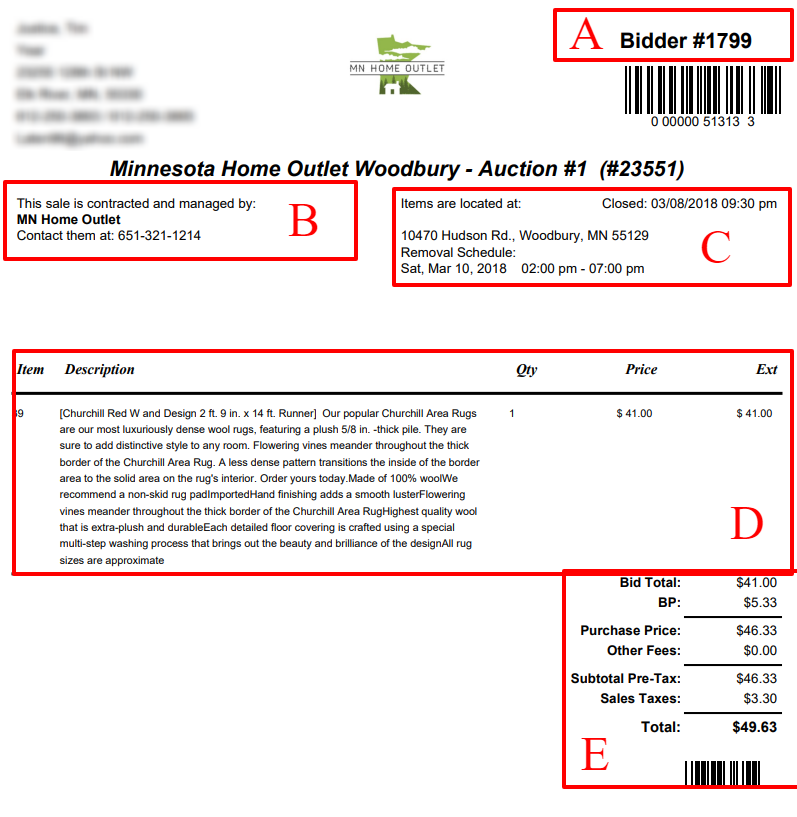
Your Invoice Explained:
A. This is your bidder number, it is a unique number assigned to every new bidder. You will be able to login to BFOBIDS.com using this number or your email address.
B. You will find the information for who contacted and managed the auction, as well as the contact info to reach out to with questions regarding the removal and payment.
C. The auction address and removal information will be provided in this section. Unless shipping or other arrangements have been made, you are expected to be at this location during this timeframe.
D. The items you won will be listed in this section.
E. This is the total amount due, including applicable Buyer's Premium and sales tax. Sales tax is calculated off the total bid price and applicable buyer's premium.